Lockly Home
- 3.8
- Rating
- 50.00K
- Installs
- Free
- Price

 Analysis by App-foxy
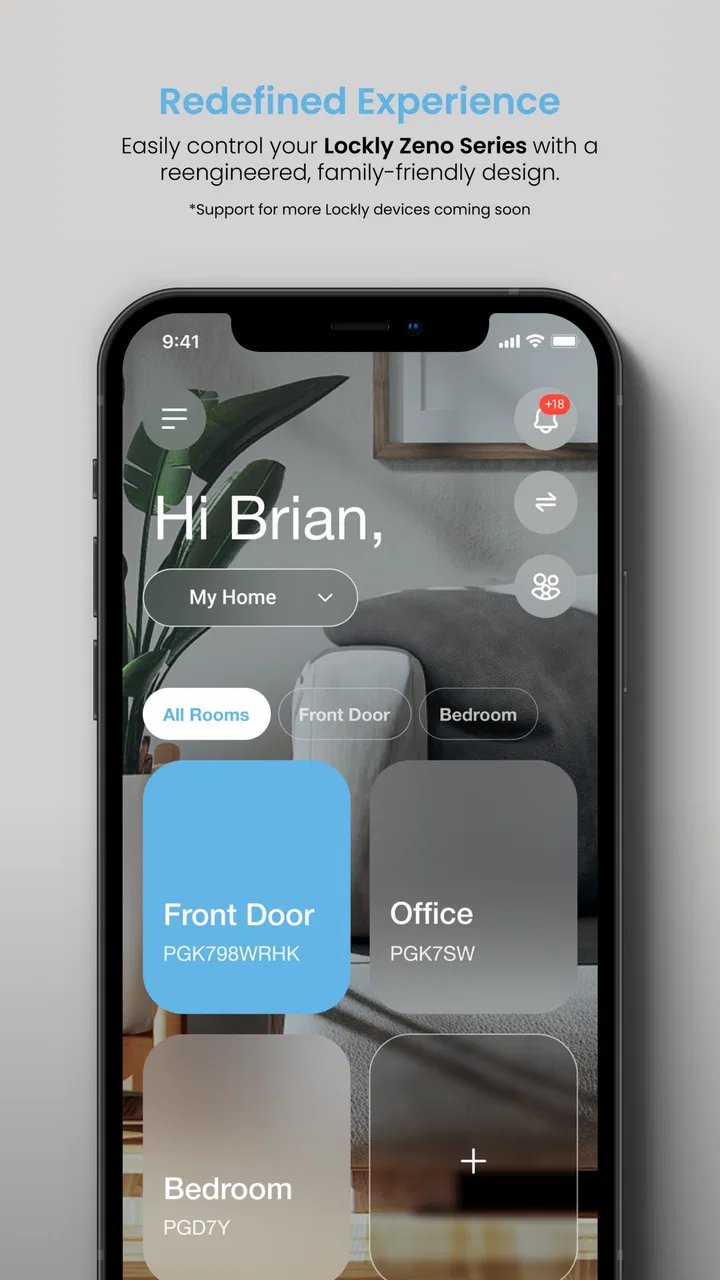
I approached Lockly Home as a practical home-control app rather than something I would open for entertainment. Its purpose is straightforward: it gives owners a way to control, manage, and monitor compatible Lockly devices from a phone. That single capability sounds simple, but it changes how I think about arriving home, checking a door, and sharing access. Instead of treating a smart lock as a standalone gadget, the app becomes the place where the lock fits into my daily routine.
The important word here is “compatible.” This is not a general remote-control tool for every smart lock in the house. It is designed around Lockly hardware, so its value depends first on whether you already use that ecosystem or plan to buy into it. For the right household, the app can make a physical lock feel easier to supervise. For someone with a different brand installed, it is not a useful replacement for the manufacturer’s own application.
Lockly Home is a free House & Home app from PIN Genie Inc., with optional in-app purchases ranging from around two dollars to around one hundred forty dollars per item. It is rated for Everyone, supports devices running Android 5.0 or later, and was released in early September 2024. The current version is 1.4.5. Those details make it accessible to a wide range of Android phones, although the usefulness of the app still comes from the Lockly device connected to it, not from the phone alone.
You May Also Like

 AccuWeather: Weather Radar
AccuWeather Review: A Quick, Clear Forecast for Everyday Decisions
For everyday plans, the best forecast is the one you can understand quickly. AccuWeather makes rain timing, radar, and local conditions easy to act on, with a few trade-offs.

 Hill Climb Racing
Why Hill Climb Racing Still Turns Crashes Into One More Run
A tiny car, a bumpy hill and one more upgrade: Hill Climb Racing keeps resurfacing because its simple chaos makes every near-miss feel personal.

 AliExpress - Shopping App
AliExpress Makes Global Shopping Feel Personal, but Shoppers Bear the Risk
AliExpress turns a global marketplace into a pocket-sized discovery engine. Its reach is useful, its shopping loop compelling, and its trade-offs easy to miss.

 Lords Mobile: Kingdom Wars
Lords Mobile Is a Kingdom-Building Routine, Not a Quick Match
A case-by-case verdict on the building, battles, device demands, and social commitments that make Lords Mobile rewarding for some players and exhausting for others.

 PDF Scanner app - TapScanner
TapScanner Makes Paperwork Easier to Capture, Check, and Share
TapScanner makes scanning with a phone feel less like a rescue operation and more like a dependable step in getting work done. Its capture tools are useful, though not flawless.

 Block Blast!
 Shows How Much a Puzzle Game Can Leave Out
A quiet grid game shows why puzzle players increasingly value instant clarity, repeatable skill and low-pressure play—and where the genre still needs to catch up.
More From Our News Desk
View All News


Why remote lock control matters more than it first appears
The strongest idea behind this app is not simply being able to tap a button instead of turning a key. The real benefit is reducing uncertainty. When I leave home in a hurry, the question is often not “Can I lock the door?” but “Did I actually lock it?” A connected Lockly device paired with this app gives that question a digital place to be answered. That is a more meaningful advantage than convenience alone.
Monitoring also matters in situations where I am not the person physically using the door. A family member may arrive before me, a cleaner may need access, or a delivery may be waiting outside. The app is most useful when the lock is part of a wider household routine and I need visibility without standing beside the door. It turns the lock from a one-time action into something I can manage as part of the day.
I would not describe this as a replacement for good household habits. A phone can be misplaced, lose power, or be unavailable when needed. I still see the physical lock and its normal access method as the foundation. The app adds a second layer of control and awareness, which is valuable, but it should not encourage careless assumptions about security or connectivity.
One practical insight is that remote management is most helpful before a problem occurs. Setting up the app while everyone is calm, checking that the correct Lockly device appears, and learning the available controls is far better than trying to understand it while waiting outside in bad weather. The app’s value is tied to preparation: the smoother the setup, the less stressful the occasional urgent use becomes.
What using the app feels like in a normal routine
In everyday use, I would treat Lockly Home as a quick status-and-action tool. I open it when I want to interact with a connected Lockly device, check what is happening with the lock, or manage the device from the same place. The appeal is that these tasks are grouped around the lock rather than scattered across phone calls, spare keys, and memory.
A realistic example is a parent leaving for work while another family member is still inside. The parent can use the app as part of the departure routine, rather than repeatedly walking back to the door to confirm it. Later, if a relative arrives, the household has a clearer way to coordinate access than hiding a key under a plant. The app does not remove the need for trust, but it can make the arrangement more deliberate.
Another useful scenario is a short-term access request. Imagine I am away and a trusted person needs to enter to check a pet or collect something important. Instead of treating access as an informal favor, I can use the Lockly ecosystem and its management app as the central place for handling the lock. The exact options available will depend on the Lockly hardware in use, so I would check the device’s capabilities before promising a particular workflow.
That device dependence is worth emphasizing. The app should not be judged in isolation from the lock it controls. If the hardware offers a feature that the app can manage, the phone becomes a convenient interface. If the hardware does not support a desired action, installing the app will not create that capability. This is one of the main differences between a dedicated manufacturer app and a broad smart-home platform.
Small habits that make the experience more reliable
I recommend opening the app during setup and identifying the device before relying on it for an important arrival. A useful habit is to perform a low-risk test while standing near the lock, then repeat the check from the normal place where I expect to use the app. That helps separate a problem with the phone, the connection, or the lock from a simple misunderstanding of the interface.
I would also avoid making the app the only way a household can enter. A trusted backup method is sensible, especially for children, older relatives, or anyone who may not carry a charged phone. This is not a criticism unique to Lockly Home; it is a general trade-off of app-managed access. The more a home depends on a phone, the more important it becomes to plan for the phone not being available.
A second non-obvious tip is to keep management decisions tidy. If several people use the household lock, decide who is responsible for adding or changing access and who should merely use the approved method. That reduces accidental changes and makes it easier to understand who should troubleshoot when something goes wrong. The app can centralize control, but the household still needs a clear process.
Finally, I would pay attention to the difference between “the app is open” and “the door is physically secure.” A screen can show an action or status, but I would still use common sense around the door itself. If the door is misaligned or cannot close properly, software cannot fix the mechanical problem. Smart control works best when the underlying lock and door are already functioning well.
The household that benefits most
The best fit is someone who already owns a Lockly device and wants a phone-based way to manage it. I can see particular value for people who frequently coordinate entry with family members, maintain a second residence, or want a clearer routine when leaving home. In these cases, the app’s central capability directly addresses a recurring problem instead of adding technology for its own sake.
It can also suit households where one person handles home management for everyone else. A busy parent, landlord, or relative helping an older family member may appreciate having lock-related tasks in one app. The benefit is not necessarily that every person needs to become a power user. It may be enough for one responsible person to understand the system well and help others use the approved access method.
I would be more cautious about recommending it to a renter who cannot install or manage compatible Lockly hardware, or to someone whose smart-home setup is built around another ecosystem. In that situation, the app’s focused design becomes a limitation. A broader platform may be better if the main goal is to operate devices from several manufacturers in one place.
It is also not the right choice for someone who wants a purely mechanical experience with no phone involvement. A traditional key or keypad may be simpler for a small household that has no interest in remote monitoring or digital management. Lockly Home adds convenience, but it also adds another layer to learn and maintain. I would only choose that layer if the control and visibility solve a real problem.
Where it differs from ordinary alternatives
The usual alternative is a key, a keypad, or a basic lock that is managed entirely at the door. Those options can be fast and dependable because they have fewer moving parts. They are also limited when I am away from home or need to coordinate entry with someone else. Lockly Home’s advantage is the ability to place the connected Lockly device into a phone-centered workflow rather than keeping every decision at the doorway.
Another alternative is a general smart-home app. That can be attractive when I already use one platform for lights, cameras, thermostats, and locks. The trade-off is that broad platforms may not expose every manufacturer-specific control as clearly as the dedicated app. Lockly Home makes more sense when the lock itself is the priority and I want the manufacturer’s own management environment.
The focused approach can also be easier for a household member who only needs lock-related tasks. They do not have to search through unrelated rooms or device categories. On the other hand, people who want one dashboard for an entire home may find a dedicated lock app less convenient, especially if switching between several applications becomes part of the routine.
My judgment is that the app earns its place when remote control and monitoring are repeated needs. If I only want to unlock the door occasionally while standing beside it, the phone may feel unnecessary. If I regularly need to check, coordinate, or manage access from a distance, the dedicated app has a much clearer purpose.
Costs, expectations, and practical friction
The app itself is free to download, which makes trying the software less of a commitment. However, the broader Lockly experience involves compatible hardware, and optional purchases inside the app are listed from around two dollars to around one hundred forty dollars per item. I would therefore separate the cost of the application from the cost of building or expanding a smart-lock setup.
That distinction matters for anyone comparing this with a conventional lock. A key does not require an app installation, account management, or a phone interface. Lockly Home can offer more control, but the extra value comes with more decisions. Before buying anything, I would confirm that the specific Lockly model supports the actions I care about and that the household is comfortable using an app as part of access management.
The current average rating is around 3.7 from over one hundred fifty ratings, with over seventy written reviews, and the app has passed fifty thousand installs. I read that as a sign of a real but still fairly focused user base rather than proof that it will suit everyone. The numbers give useful context, but my decision would depend more on owning compatible Lockly hardware and needing its particular control model.
There is also a learning curve that does not come from the number of buttons alone. The challenge is understanding responsibility: who manages the device, who is permitted to use it, and what the backup plan is if the phone or connection is unavailable. That is why I would introduce the app gradually, test it with trusted users, and avoid making an important access arrangement until everyone understands the routine.
My recommendation after weighing the trade-offs
Lockly Home is a sensible companion for a Lockly smart-lock setup when the main need is remote control, management, and monitoring. I like the way its purpose stays close to a real household concern: knowing what is happening at the door and handling access without always being there. The strongest use cases involve repeated coordination, not occasional novelty.
I would recommend it to Lockly owners who want a dedicated way to manage their device and are willing to keep a backup entry plan. I would also recommend taking a little time to test the workflow before depending on it during travel, caregiving, or scheduled visits. That preparation is more important than chasing every available option.
I would skip it if I do not own compatible Lockly hardware, if I strongly prefer a non-digital lock, or if I need one app to control products from many different brands. In those cases, a standard lock or a broader smart-home platform may be a better match. Lockly Home is not trying to be everything for every home, and that focused role is both its strength and its boundary.
Overall, I see it as a useful control layer rather than a complete security solution. It can make a Lockly device easier to supervise and more practical in a busy household, but it works best when paired with sound physical security, clear access rules, and realistic expectations about phones and connectivity. For the right owner, that combination can turn a smart lock from an isolated gadget into a genuinely helpful part of the daily routine.
FAQs for Lockly Home
01What is Lockly Home, and how does it work?
Lockly Home is a smart lock application designed to enhance home security by allowing users to control their Lockly devices through their smartphones. The app offers features like remote access, real-time monitoring, and customizable access codes, enabling you to manage entry to your home from anywhere, ensuring both convenience and peace of mind.
02Is Lockly Home compatible with all Lockly devices?
Lockly Home is compatible with a range of Lockly smart locks, but it's important to check the specific model compatibility on the Lockly website or within the app. Compatibility ensures you can fully utilize features like remote access, biometric unlocking, and real-time notifications tailored to your device.
03How secure is Lockly Home, and what measures are in place to protect user data?
Lockly Home prioritizes security with features such as 256-bit encryption and offline access codes to safeguard against hacking. The app also employs advanced biometric verification to ensure only authorized users can manage lock settings, providing robust protection for your home and personal data.
04Does Lockly Home require a subscription, or are there any hidden costs?
Lockly Home is free to download and use with your Lockly smart lock. However, certain advanced features or integrations, such as cloud storage or third-party smart home system compatibility, may require additional purchases or subscriptions. Always check the app's store page for the latest information on pricing.
05Can Lockly Home integrate with other smart home systems?
Yes, Lockly Home offers integration with various smart home systems, such as Amazon Alexa and Google Assistant. This allows you to control your locks using voice commands and create seamless smart home routines. Ensure your smart home hub supports these integrations for optimal functionality.
Pros
- User-friendly interface for easy navigation.
- Advanced security features enhance safety.
- Supports multiple access methods.
- Convenient remote access via smartphone.
- Real-time alerts for unauthorized attempts.
Cons
- Setup can be complex for beginners.
- Requires stable internet for optimal use.
- Limited compatibility with some devices.
- Battery life drains faster with heavy use.
- Higher price compared to similar apps.

Lockly Home
Gallery